I just joined a week ago, and I think it would be nice if new members could ask questions about how to use the site, specifically forums. Older members please help out, it would be appreciated.
My question: how do I post pictures? It perturbs me.
Last posted Apr 14, 2013 at 07:37PM EDT. Added May 24, 2011 at 11:07PM EDT
176 conversations with 83 participants
I just joined a week ago, and I think it would be nice if new members could ask questions about how to use the site, specifically forums. Older members please help out, it would be appreciated.
My question: how do I post pictures? It perturbs me.
Post the image url in the post, with an Exclamation Point ! on each end
aka
!http://cultofmac.cultofmaccom.netdna-cdn.com/wordpress/wp-content/uploads/2010/05/phoenix-wright-objection.jpg ! (ignore the space at the end, that’s just to show where to put it)
creates

No Osaka being awesome?
Piano wrote:
No Osaka being awesome?
OH SHI-
Hang on…
Phew. Can;t believe I forgot about that….
Much better, thank you.
Are there any limitations to the images or GIFs besides the obvious no NSFW images or GIFs? For example: Size limits etc.
Not that I’m aware of. HUUUUUUUUUUGE images will just get shrunk down.
I’m pretty sure it’s not a good thing topost really big pictures in the comment sections on memes and pictures, but that’s more of a politeness thing.
Drpepperfan #1 Fan Of Osaka and Trixie wrote:
Not that I’m aware of. HUUUUUUUUUUGE images will just get shrunk down.
I’m pretty sure it’s not a good thing topost really big pictures in the comment sections on memes and pictures, but that’s more of a politeness thing.
They will get shrunken down but you can right click on them, then press view image, and they will go back to original size, and sometimes you can just click on them and they will go to that view image page.
There are no size limits as the picture is usually hosted outside of KYM.
Pictures uploaded to KYM have a 2 mb? limit though.
Huge pictures will automatically be shrunken down to “100%” height. As Dane said, you can see the full image by finding the image url, although some people don’t know this.
If you want to change the size of the image itself (not the filesize), then you can just do one of these:
Taking up a percentage of the allotted space:<img src="http://i.imgur.com/dqwgR.jpg" width="50%">
Taking up a specific amount of pixels:<img src="http://i.imgur.com/dqwgR.jpg" width="300">
You can also do the favor of linking to the larger picture if the post makes the image unreadable:<a href="http://i.imgur.com/dqwgR.jpg"><img src="http://i.imgur.com/dqwgR.jpg" width="30%"></a>
Drpepperfan #1 Fan Of Osaka and Trixie wrote:
OH SHI-
Hang on…
Phew. Can;t believe I forgot about that….
This user has been deactivated and their posts are no longer visible.
Ok, here goes nothing….

FUCK YEAH SUCCESS!! Does it work with GIFs too?
It does work with GIFs.
Wow, that’s an interestin- ALL GLORY TO THE HYPNOTOAD
Fridge Logic wrote:
Wow, that’s an interestin- ALL GLORY TO THE HYPNOTOAD
He’s real and he’s coming to take over the universe.
Chris wrote:
He’s real and he’s coming to take over the universe.
I for one, welcome our new Hypnotoad overlord.
ALL GLORY TO THE HYPNOTOAD
On a non-related note, how do you create articles?
You go to the meme tab up at the top of the page, then to the right of ‘Featured Memes’ you see “+Add An Entry”.
Use that.
2 Questions
1. How to post hard drive pics
2. How to post YouTube videos
3. How to favor memes
3 Questions. Oh Damn! 
Do you mean in the forums? If you do, then;
1. You have to upload it to a website first, either this site or some other image hosting site, (my favourite is imgur.com) and then do the same thing I said before.
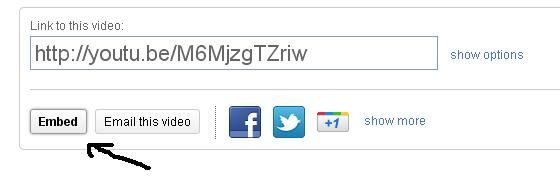
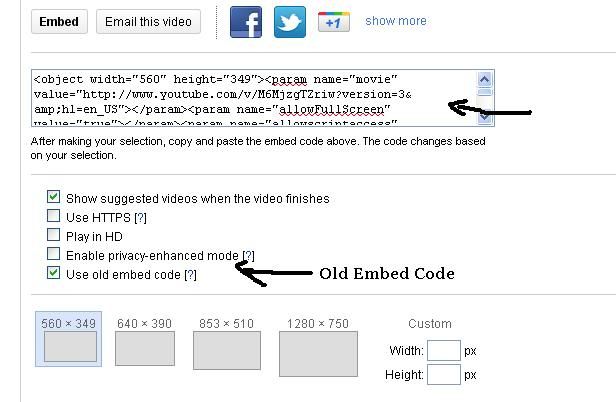
2. On any youtube video, under the video, there is a button that says Share. Click on it, and then on embed. Copy and paste the embed code it gives you into the comment box, and viola, the video is in the comment!
3. To favourite a meme, there is a small star near the top of the meme page, next to the title. Click on it. That’s it.
Fridge Logic wrote:
2 Questions
1. How to post hard drive pics
2. How to post YouTube videos
3. How to favor memes
3 Questions. Oh Damn!
1) To post pictures from you harddrive, you must first upload them to some website, you can upload to our database here where it says +Add Image.
You must then copy the image location and put that url between exclamation marks like so: !www.sampleimageurlhere.com ! (without the second space)
2) You post youtube videos by going to the video in question, clicking the Share button and then click the embed button in the lower left part of the panel that pops up. Then copy and paste the code where you want the video to be.
I’m not sure if the new embed code works yet though, so if it doesn’t, check the box that says ‘Use Old Embed Code’ and copy-paste that where you want it.
3) You can favorite memes, photos, or videos by clicking the golden star in the upper right corner of the entry/photo page/video page.
Have fun!
Edit: Slightly too late. =/
Thanks for your answers and questions, everyone. Keep posting!
I have a new user question. Is there anyway to view your individual favorite photos? I know you can just save the pics you like to your computer, but it would be nice to have the KYM photo page in an easy to find place for all comments and other info.
This user has been deactivated and their posts are no longer visible.
Matt wrote:
This quote is not visible as the quoted user has been deactivated.

Not so new, but shouldn’t this thread have been under site-related and not general. lol! also why do the [s] [strike] [del] or css [span style=“text-decoration:line-through;” ] tags work?
Note: replace “[” and “]” with "" because I couldn’t get it to display the code either with [pre] [xmp] or [textbox].
The Stare Master wrote:
Not so new, but shouldn’t this thread have been under site-related and not general. lol! also why do the [s] [strike] [del] or css [span style=“text-decoration:line-through;” ] tags work?
Note: replace “[” and “]” with "" because I couldn’t get it to display the code either with [pre] [xmp] or [textbox].
What exact type of post are you referring to? Pics, video or something else?
strikethrough text! and the last part was displaying code.
There seems to be a bit of confusion regarding actual video, instead of a link or something else. It doesn’t work the same way as with images, so I’d like to be very specific:
How do you post a YouTube Video? On a thread. And please demonstrate, if you can.
Fridge Logic wrote:
There seems to be a bit of confusion regarding actual video, instead of a link or something else. It doesn’t work the same way as with images, so I’d like to be very specific:
How do you post a YouTube Video? On a thread. And please demonstrate, if you can.
Got to the Youtube video and press the share button that is under the video.
After that, click the embed button.
Then copy and paste the code into the thread. If the new code doesn’t work, use the old embed style. This section also allows you to choose the size of the video, but the standard one works just fine, so there is no need to make giant videos.

I hope I helped.
AHA! EUREKA! The dulcet tones of Mr. Rick Astley have signaled victory! Thank you, Christopher The Pimp Abra, you were indeed useful.
If I may pose yet another question, how does one apply for editorship?
You can also change the size apparently ( I was going to add a different youtube poop but embedding was disabled :( )
Fridge Logic wrote:
AHA! EUREKA! The dulcet tones of Mr. Rick Astley have signaled victory! Thank you, Christopher The Pimp Abra, you were indeed useful.
If I may pose yet another question, how does one apply for editorship?
On the side of an entry, right above the editors currently working on the article, there is a red button that says “+ Request Editorship”.
Either hit that, message the first editor of the entry, or ask an entry mod, community mod, or one of our admins to add you to it.
Cool Beans, thanks.
This user has been deactivated and their posts are no longer visible.
Quickie: the term PM is being used on the forums. What does it mean. Please respond asap.
I think it’s somewhat Private Message, but Im not that sure
Actually, you are correct.
Seems like I’m the only one posting questions on this thread. Oh well.
How does one change their name?
Go to your profile by clicking your name.
Click on edit your profile.
Change first/last name.
????
PROFIT
<3
Sorry, I meant screen name. Like mine is “Vulcan0110”. I didn’t mean real name.
Changing your real name changes your screen name. It is one and the same.
That makes sense
Also, this thread is now 28 days old. Prepare for infection.


I’m sorry, I know that was stupid. I just had to.
hey, a topic that answers all of my questions Edit: Oh the irony, how do I make this smiley(withoiut the spaces)? ^ _ ^
maybe a guide could be made somewhere?
Sorry to seem like a real noob, how do i pm someone?
Joshel: You can go to their page and click the “contact user” button towards the top.
Chipbeat: I think there might be something in Textile that’s making the site read that differently? One thing you can do is surround it with @ signs, so it reads it as “code” and shows it exactly as you wrote it, but in a different typeface:
@^_^@^_^
Ty ;)
also, thank you ^_^
can i post a pic by imgur?
and if i can,how?
In case you've missed it, watch Know Your Meme's report on Chocolate Rain! For related discussions, check out the episode comments.
Already a memeber? |
Don't have an account? |